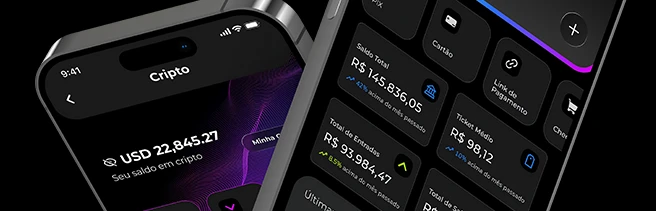
When you sell, you need to know at any moment how much came in, what is still pending and what your balance is. With the Sila Pay app, that information is on your phone: you track sales, check your balance and charge customers wherever you are, whether in your shop, at a market stall or in a food truck.
What is the Sila Pay app
It is Sila Pay’s app for merchants, available for iPhone on the App Store and for Android on Google Play. It brings together what you use most every day: balance, sales statement, Pix charges, payment links and support.
How to get started, step by step
- Download the app: search for Sila Pay on the App Store or Google Play.
- Log in or create your account: if you are not registered yet, you can open an account in the app itself, with photos of your documents and a selfie.
- Use biometrics: log in with Face ID or your phone’s biometrics instead of typing your password every time.
- Track and charge: see your sales on the home screen and use the Pix, Card and Payment Link shortcuts.
What you can track on your phone
- Balance and overview: total balance, total incoming, total outgoing and average ticket right on the home screen.
- Sales and statement: every transaction with its payment method (Pix, card or boleto), amount and status, such as paid, pending or refunded.
- Details of each sale: tap a transaction to see the full information.
- Notifications: your account alerts are gathered in one place inside the app.
Charge and move money without leaving the app
- Pix: create a charge with a QR code, make transfers, scan a QR code or use Pix Copy and Paste.
- Payment links: create, send, edit and track links that accept Pix, card and boleto.
- Card: charge a card by sending your customer a link.
- Team: the account owner can invite people and set each person’s role.
- Support: open a support request directly in the app.
Want to track your sales from your phone? Open your Sila Pay account
Tips to get the most out of the app
- Check the status before handing over the order: a sale marked as paid has been confirmed.
- Pull down on the home screen to refresh your balance and sales.
- For WhatsApp sales, create the payment link in the app and send it in the same chat.
- If someone helps you at the counter, invite them through Team instead of sharing your password.
Frequently asked questions
How do I find the app in the stores?
Search for Sila Pay. On the App Store, the app is listed as “Aurum Nexus - Sila Pay”.
Does it work on tablets?
On iOS, the app is designed for iPhone. On Android, it is available on Google Play.
Can I access more than one account?
Yes. If you have access to more than one account, such as your own and a company’s, you choose the account when you log in.
Do I need a Brazilian company (CNPJ)?
With Sila Pay you can sell as an individual or as a company; the sign-up process lists the documents required in each case.
Your sales and balance in your pocket, at any time. Sign up for Sila Pay